



What Causes Missed RFID Reads During Routine Tracking Operations?
RFID technology helps businesses track inventory, identify equipment, manage tools, and monitor the movement of assets throughout daily operations. However, even a properly installed RFID system may occasionally fail to detect a tagged item.
Missed RFID reads can lead to inaccurate inventory records, incomplete asset histories, and delays in warehouse or production workflows. When these problems occur repeatedly, employees may need to perform manual checks, reducing the efficiency of RFID-based tracking.
Understanding why RFID tags are missed is the first step toward improving system reliability. The cause may involve the tag itself, its installation position, the reader and antenna configuration, environmental interference, or the software that processes read events.
This guide explains the most common causes of missed RFID reads during routine tracking operations and how to troubleshoot them.
1. Incorrect RFID Tag Placement or Orientation
RFID tags communicate with readers through radio-frequency signals. Their performance depends partly on the relationship between the tag antenna and the reader antenna.
If a tag is installed in an unfavorable position, the reader may receive a weak signal or fail to identify the tag during a particular reading attempt.
Common problems include:
-
Tags placed in locations that are difficult for the reader to reach
-
Inconsistent tag orientation across similar items
-
Tags mounted too close to metal or liquid-rich materials
-
Tags covered by packaging or other objects
-
Tags positioned outside the effective antenna coverage area
For example, a warehouse may use UHF RFID tags on reusable containers. If some tags face the reader while others are rotated or positioned behind metal components, reading results may vary even when the same reader is used.
How to fix it: Standardize tag placement wherever possible. Test different orientations and mounting positions on representative assets, then document the approved installation method.
2. Metal Surfaces and Other Materials Affecting RFID Performance
Metal is a common cause of missed reads in industrial environments. When a conventional RFID tag is mounted directly on a metal surface, the metal can alter the tag antenna's electrical characteristics and interfere with normal communication.
This issue often occurs with:
-
Industrial machinery and metal cabinets
-
Tools and metal components
-
Metal storage bins and containers
-
Equipment mounted on steel racks
-
Assets located near large conductive structures
Liquids and other materials can also affect RF propagation. The extent of the impact depends on the frequency, material properties, tag design, and system configuration.
How to fix it: For tags mounted directly on metal, evaluate a compatible on-metal or anti-metal RFID tag. For other materials, test the tag in its actual mounting position rather than relying only on its performance in open space.
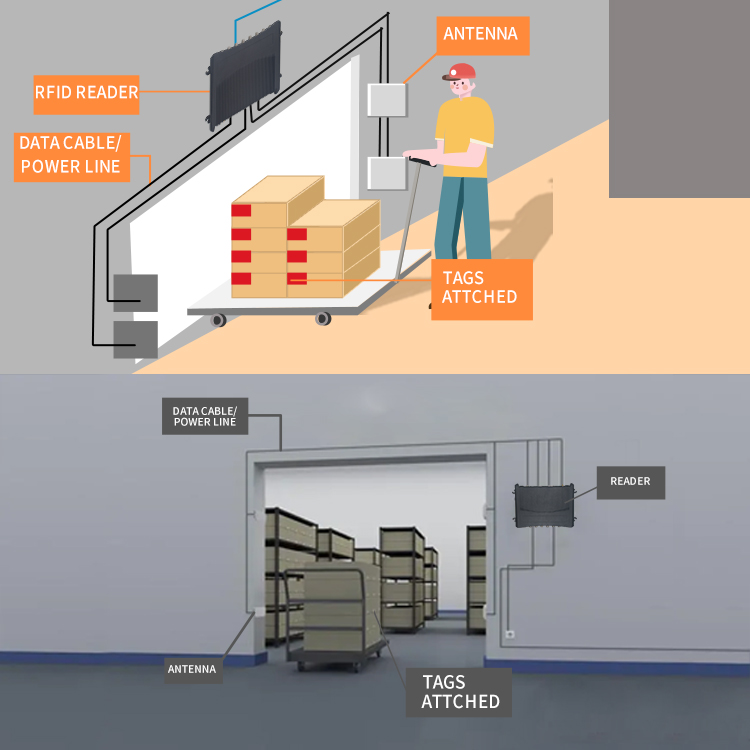
3. Poor Reader or Antenna Coverage
A tag cannot be read reliably if it does not receive sufficient RF energy or if its response does not reach the reader with adequate strength.
Coverage problems may occur when antennas are poorly positioned, the read zone is too small, or objects move through areas with weak signal coverage.
Typical examples include:
-
Gaps between adjacent antenna coverage areas
-
Tags located behind shelving or machinery
-
Items moving along the edge of a conveyor
-
Antennas installed at unsuitable heights or angles
-
Assets passing through a reading zone too quickly
Increasing reader power is not always the correct solution. Excessive power may cause tags outside the intended zone to be detected, creating unwanted reads and making it harder to distinguish specific tracking events.
How to fix it: Map the intended read zone and test tag detection at different positions, distances, and orientations. Adjust antenna placement and reader power systematically. Where necessary, evaluate additional antennas or a revised layout.
4. Incorrect RFID Reader Configuration
RFID readers use configurable parameters to manage tag inventory, communication, and event reporting. Settings that are unsuitable for the application can contribute to missed reads.
Potential issues include:
-
Transmit power that is too low for the required coverage
-
Inventory settings unsuitable for the expected tag population
-
Incorrect frequency or protocol configuration
-
Reader timing that does not match the workflow
-
Regional settings that do not comply with the operating environment
-
Reader configurations that have changed during maintenance
For UHF RFID systems, anti-collision settings help the reader identify multiple tags within a reading zone. The appropriate configuration depends on the reader model, tag population, and application requirements.
How to fix it: Verify the reader's frequency, protocol, power, inventory settings, and reporting behavior against the manufacturer's documentation. Change one parameter at a time and compare the results using a repeatable test.
5. High Tag Density and Simultaneous Reads
In warehouses, distribution centers, and production facilities, many RFID tags may be present in the same reading area. Examples include pallets carrying multiple cartons, shelves holding numerous tagged items, or containers moving through a checkpoint together.
A high tag population can increase the time needed to inventory all tags. If the reading window is too short or the reader configuration is unsuitable, some tags may not be detected during a particular cycle.
Tag placement and physical stacking can also affect performance, particularly when tags are close to metal, liquids, or other tags in unfavorable arrangements.
How to fix it:
-
Test the reader with the maximum expected tag population.
-
Review the manufacturer's recommendations for dense-tag environments.
-
Check whether items remain in the read zone long enough.
-
Optimize inventory parameters for the actual application.
-
Improve tag placement and spacing where operationally practical.
-
Verify that the software does not discard valid tag events.
Do not assume that every missed tag is caused by tag collision. Poor coverage, unsuitable mounting, and software filtering can produce similar symptoms.
6. Movement Speed and Insufficient Reading Time
Routine tracking often involves moving assets rather than scanning stationary items. A tagged item may pass through a reader's effective zone too quickly to be detected consistently.
This can occur on:
-
High-speed conveyor belts
-
Warehouse entry and exit points
-
Automated production lines
-
Vehicle or container checkpoints
-
Material-handling routes
The problem may become more noticeable during peak operations, when items move faster or are placed closer together.
How to fix it: Test at normal and peak operating speeds. Ensure the read zone covers the full movement path and that the reader can inventory tags within the available time. If the workflow permits, adjust conveyor speed, item spacing, antenna placement, or reading-zone length.
For moving assets, use a known set of tags to compare expected and actual detections across repeated passes.
7. Radio-Frequency Interference From Nearby Equipment
RFID readers operate in radio-frequency environments that may include other readers, wireless systems, electrical equipment, and reflective structures.
Interference or poorly coordinated reader operation can reduce effective communication and contribute to inconsistent results. Metal structures may also create reflections and uneven coverage, even when there is no external interference source.
Possible warning signs include:
-
Reads becoming less reliable when another reader is active
-
Performance changing after equipment is installed nearby
-
Inconsistent results in specific locations
-
Detection problems that vary with reader configuration
How to fix it: Inspect nearby RFID installations and evaluate the system while surrounding equipment operates normally. Where supported, coordinate reader timing, review permitted channel settings, and adjust antenna placement or power.
Follow local radio regulations and the reader manufacturer's instructions. Do not assume that simply increasing transmit power will resolve interference.
8. Damaged, Defective, or Unsuitable RFID Tags
A tag may be missed because it is physically damaged or unsuitable for the operating environment.
Potential causes include:
-
Cracked or deformed tag housings
-
Damaged antenna structures
-
Moisture ingress in tags not designed for the exposure
-
Adhesive failure that changes tag position
-
Repeated impacts or abrasion
-
Exposure to temperatures or chemicals outside the tag's specifications
-
Incorrect tag frequency or protocol for the reader
Damage may be obvious, but some antenna failures are difficult to detect visually.
How to fix it: Compare the suspect tag with a known-good tag of the correct model. Test both using the same reader, antenna, position, and settings. If the problem follows the tag across suitable test conditions, inspect it for damage and verify its specifications.
For industrial applications, select tags based on the actual mounting surface and environmental requirements. Replace damaged tags with compatible models rather than assuming that visually similar tags will perform identically.
9. Software Filtering and Data Processing Errors
Not all missed reads originate in the radio-frequency layer. Sometimes a reader successfully detects a tag, but the tag does not appear in the tracking application.
Possible causes include:
-
Middleware filters that discard valid events
-
Duplicate-suppression rules that are too aggressive
-
Network communication failures
-
Delays in database updates
-
Incorrect mapping between tag IDs and asset records
-
Application rules that ignore reads outside expected time windows
-
Incorrect event grouping or location logic
For example, a system may intentionally suppress repeated reads of the same tag within a short interval. If the interval is configured incorrectly, a legitimate second event may be hidden.
How to fix it: Trace the event through each stage of the system:
-
Confirm whether the reader detects the tag.
-
Check whether the event is transmitted to the middleware or application.
-
Review filters, duplicate handling, and event timing.
-
Verify that the tag ID maps to the correct asset record.
-
Check network logs and database processing for errors.
This step prevents unnecessary hardware replacement when the real issue is in software or data handling.
10. Incorrect Expectations About RFID Read Range
RFID read range is not a fixed distance that applies to every installation. Actual performance depends on tag design, reader power, antenna characteristics, tag orientation, surrounding materials, and environmental conditions.
A tag advertised for long-range reading may perform well under ideal conditions but deliver shorter or less consistent results when mounted on equipment, surrounded by inventory, or placed near metal.
A read-range problem can also be confused with a coverage problem: the reader may detect the tag at one position but fail to reach it consistently elsewhere in the work area.
How to fix it: Evaluate read performance using the complete system under realistic conditions. Measure detection at different distances and angles, and test the tag on its intended asset. Avoid using advertised maximum read range as the only criterion for selecting tags or readers.
11. A Practical Process for Diagnosing Missed RFID Reads
A structured troubleshooting process helps identify the cause without changing multiple parts of the system unnecessarily.
Step 1: Define the Expected Result
Choose a known set of tagged assets and record the identifiers that should be detected during the test.
Step 2: Test a Known-Good Tag
Use a compatible tag that is known to work. If it reads consistently under the same conditions, the original tag or its installation may be responsible.
Step 3: Check the Mounting Position
Inspect the tag's orientation, surface, attachment, and nearby materials. Test an alternative position if appropriate.
Step 4: Review Reader and Antenna Settings
Confirm frequency, protocol, power, antenna connections, and inventory settings. Inspect the intended read zone for coverage gaps.
Step 5: Reproduce Normal Operating Conditions
Repeat the test with realistic movement speed, tag density, and nearby equipment operating as usual.
Step 6: Inspect Reader and Application Logs
Determine whether the tag is missing at the RF layer or disappearing during software processing.
Step 7: Change One Variable at a Time
Record each configuration change and its results. This makes it easier to identify the cause and reproduce a successful configuration.
12. Measure Read Performance Consistently
A repeatable measurement process can help teams determine whether a change actually improves RFID tracking.
One useful metric is the read success rate:
Read success rate = unique expected tags successfully detected ÷ total unique expected tags × 100%
For example, if a test contains 250 expected tags and 240 are successfully detected, the observed read success rate is 96%.
This result describes that particular test only. It should not be treated as a guarantee of performance in other locations, at different movement speeds, or with different tag populations.
For a more complete assessment, also measure:
-
Unwanted reads from outside the intended zone
-
Duplicate event rates
-
Time required to complete an inventory cycle
-
Read performance at peak operating speed
-
Variation across different tag types and mounting positions
Document the test conditions so that results can be compared fairly before and after changes.
13. Prevent Recurring Missed Reads
Once the immediate problem has been resolved, establish procedures to keep the system reliable as operations change.
Recommended practices include:
-
Standardizing tag models and mounting positions for similar assets
-
Inspecting tags and attachment points during routine maintenance
-
Recording approved reader and antenna configurations
-
Monitoring reader logs for recurring failure patterns
-
Retesting after layout changes or new equipment installations
-
Checking software filters and integrations after system updates
-
Testing replacement tags before large-scale deployment
A configuration that works in one warehouse area may not work equally well in another. Document important differences in shelving, asset materials, movement speed, and reader layout.
Missed RFID reads during routine tracking operations can result from tag placement, metal interference, inadequate antenna coverage, reader configuration, high tag density, fast-moving items, damaged tags, or software processing errors.
The most effective solution is to identify where the failure occurs before changing hardware or settings. Start with a known-good tag, inspect the mounting position, review antenna coverage and reader configuration, and reproduce the issue under realistic operating conditions.
By combining systematic troubleshooting with repeatable performance testing, businesses can improve RFID tracking reliability and reduce avoidable gaps in inventory and asset records.
Need help selecting RFID tags or readers for your tracking application? EFLDAY provides RFID tag and reader solutions for industrial identification, inventory management, and asset tracking. Share your tag type, asset material, operating environment, reading distance, and expected tag volume with our team to discuss a suitable solution.