




What Should You Check Before Attaching an RFID Tag to Equipment?
Attaching an RFID tag to equipment may seem straightforward, but the installation method can affect identification reliability, tag durability, and long-term maintenance. A tag that works well during initial testing may perform differently after it is mounted on a machine, tool, metal enclosure, or other industrial asset.
Before attaching an RFID tag, it is important to check the equipment material, mounting surface, tag compatibility, attachment method, environmental conditions, and intended reading process. These checks help prevent avoidable installation problems and reduce the need for rework.
This guide explains what to evaluate before installing RFID tags on industrial equipment and how to validate the installation before deployment.
1. Check the Equipment Material
The first step is to identify the material where the RFID tag will be mounted. Metal, plastic, glass, wood, and composite surfaces can create different operating conditions for an RFID tag.
Metal equipment
Metal can detune the antenna of a conventional RFID tag and alter the surrounding RF field. A standard label that performs well on cardboard may therefore perform poorly when attached directly to a metal machine or tool.
If the tag must be mounted on metal, consider an anti-metal RFID tag designed for that application. Check the manufacturer's mounting instructions and verify that the selected model is suitable for the equipment's shape, surface, and operating conditions.
Plastic and non-metallic equipment
Plastic housings and non-metallic surfaces may be suitable for conventional RFID labels or other tag types. However, the surrounding materials still matter. Liquids, metal components inside the equipment, protective covers, and nearby structures can affect the reading environment.
Do not select a tag based on the outer material alone. Consider the complete installation, including what is behind or around the mounting surface.
2. Inspect the Mounting Surface
A suitable tag can still fail to remain attached if the surface is dirty, uneven, oily, wet, or exposed to conditions that weaken the mounting method.
Before installation, inspect the intended location for:
-
Dust, oil, grease, and other contamination
-
Moisture or condensation
-
Rust, corrosion, loose paint, or flaking coatings
-
Curved or uneven surfaces
-
Existing labels, coatings, or protective films
-
Areas exposed to repeated friction or impact
The surface should meet the requirements of the chosen adhesive, fastener, or mounting bracket.
If an adhesive-backed tag is being used, follow the manufacturer's surface preparation instructions. Some adhesives require a clean, dry surface and a specified application temperature. Other mounting methods may be more appropriate for rough, curved, or frequently handled equipment.
Avoid attaching a tag to a surface that is likely to peel, deteriorate, or be removed during normal maintenance.
3. Confirm That the RFID Tag Is Compatible with the Reader
Before attaching a tag, confirm that it is compatible with the RFID reader and the tracking system.
Important considerations include:
Frequency: The tag and reader must operate within compatible frequency bands. UHF, HF, and NFC tags are not interchangeable simply because they all use RFID technology.
RFID standard: Check whether the tag supports the protocol required by the reader and application.
Read requirements: Determine the expected reading distance, tag orientation, and whether the equipment will be read by a handheld device or a fixed reader.
Data requirements: Confirm whether the system needs only a unique identifier or additional data stored on the tag.
Physical dimensions: Ensure that the tag fits the available mounting area without interfering with equipment operation.
Compatibility should be confirmed before installation because changing tag models after deployment can create additional labor and validation costs.
4. Choose a Mounting Method That Suits the Equipment
The attachment method should keep the tag in the intended position throughout normal use.
Common options include adhesive backing, screws, rivets, mounting brackets, cable ties, and dedicated tag holders. The appropriate choice depends on the tag design, surface material, equipment geometry, and environmental conditions.
Adhesive mounting
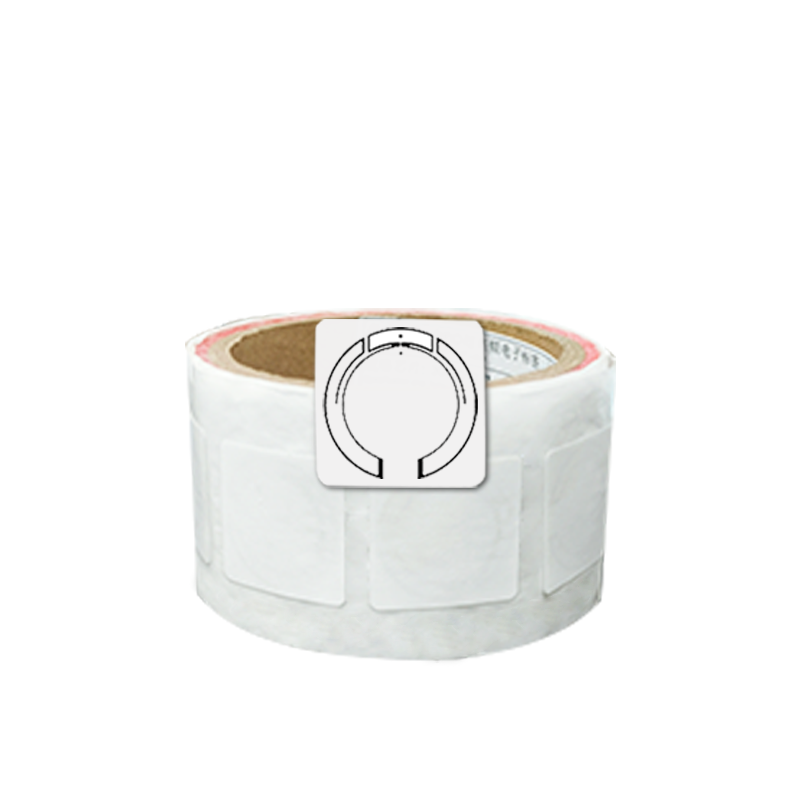
Adhesive-backed tags can provide a simple installation method when the surface and operating conditions are suitable. Check the adhesive's compatibility with the surface, expected temperature range, moisture exposure, and cleaning chemicals.
Mechanical fastening
Screws, rivets, or brackets may be appropriate when the equipment experiences vibration, repeated handling, or conditions that make adhesive attachment unreliable. However, drilling or modifying equipment may affect its structure, protective coating, warranty, or safety requirements.
Obtain the necessary approval before modifying the equipment.
Protective holders
A holder can help protect a tag from abrasion or impact and may simplify replacement. Make sure the holder itself does not interfere with RFID performance or obstruct the intended reading path.
Whichever method is chosen, confirm that the tag will remain secure without interfering with moving parts, controls, ventilation, inspection points, or routine maintenance.
5. Check Temperature and Environmental Conditions
Industrial equipment may operate in environments that expose RFID tags to temperature changes, moisture, dust, vibration, chemicals, or sunlight.
Before attaching a tag, compare the actual operating conditions with the tag manufacturer's specifications.
Review:
-
Operating and storage temperature limits
-
Water and dust resistance
-
Exposure to cleaning agents, oils, or chemicals
-
Vibration and mechanical shock
-
UV exposure and outdoor weather
-
Abrasion and repeated handling
Pay attention to the difference between a tag's operating temperature rating and its installation requirements. An adhesive may need to be applied within a particular temperature range even if the tag can later operate at a wider range.
For harsh industrial environments, choose a tag construction and mounting method suited to the full service conditions. If the equipment is cleaned frequently or exposed to chemicals, verify compatibility rather than assuming that a tag described as industrial-grade will withstand every substance or process.
6. Identify a Position That Supports Reliable Reading
Before attaching the tag permanently, check whether the proposed location provides suitable conditions for the intended reader.
A tag may be physically secure but difficult to identify because it is poorly oriented, too far from the antenna, shielded by equipment components, or affected by nearby materials.
Consider the following:
-
Is the tag accessible to the intended reader?
-
Will equipment components obstruct the reading path?
-
Can the tag be read at the required distance?
-
Could the tag's orientation change during normal operation?
-
Are nearby metal surfaces likely to affect the selected tag?
-
Could the reader identify other nearby assets unintentionally?
For equipment that moves between locations, test representative reading positions and orientations. For fixed assets, verify that the chosen location works with the installed reader and antenna arrangement.
Do not assume that the longest possible read range is always desirable. Some applications require a controlled reading zone to distinguish one asset from nearby equipment.
7. Check the Equipment's Normal Use and Maintenance Process
An installation location must remain practical throughout the equipment's service life.
Before attaching a tag, consider how the equipment is operated, cleaned, inspected, repaired, and stored. A tag may be damaged if it is placed where operators regularly grip the equipment, tools make contact with the surface, or technicians remove panels during maintenance.
Avoid locations that:
-
Obstruct controls, handles, safety labels, or moving parts
-
Interfere with normal operation or inspection
-
Are regularly struck, scraped, or covered
-
Must be removed during routine servicing
-
Make the tag difficult to inspect or replace
For equipment fleets, it is also useful to standardize the tag location across similar assets. Consistent placement can simplify handheld scanning, staff training, maintenance, and future audits.
If different equipment models require different mounting positions, document the approved location for each asset category.
8. Test the Tag Before Finalizing the Installation
Whenever practical, test the tag at the proposed mounting location before making the installation permanent.
A simple preliminary test can help identify compatibility or placement issues before they affect a large number of assets.
A practical process is:
-
Select the tag model intended for the application.
-
Position it on the actual equipment surface using the proposed mounting method.
-
Test it with the intended reader and antenna.
-
Check identification at the expected distance and orientation.
-
Repeat the test under realistic operating conditions.
-
Compare the result with the application's acceptance criteria.
-
Confirm that the tag remains secure after the relevant handling or environmental tests.
For metal equipment, test the tag while it is mounted on the actual metal surface. Testing the same tag on a cardboard box or plastic table does not establish how it will perform on metal.
For mobile equipment, include realistic movement conditions. For equipment used around dense inventory or other RFID readers, reproduce those conditions as closely as possible.
If performance is inconsistent, adjust the mounting location or configuration and retest before applying the same installation method across the entire fleet.
9. Establish Installation and Acceptance Criteria
A repeatable installation process should include clear acceptance criteria rather than relying only on visual inspection.
Depending on the application, criteria may include:
-
Correct tag model and identifier
-
Approved mounting location and orientation
-
Secure attachment
-
Successful identification by the intended reader
-
Acceptable read completeness under defined test conditions
-
No interference with equipment operation or safety
-
Compliance with environmental and maintenance requirements
For larger projects, record the asset identifier, tag identifier, tag model, installation date, mounting location, and test result. Photographs may also help future technicians verify the correct position.
Documentation is particularly useful when multiple installers work across different sites or when tags must be replaced over time.
10. RFID Equipment Tag Installation Checklist
Before completing an installation, use this checklist:
Confirm the equipment material and mounting surface.
Select a tag compatible with the reader and RFID standard.
Verify whether an anti-metal tag is required.
Inspect and prepare the mounting surface.
Choose an attachment method suited to the operating environment.
Check temperature, moisture, chemicals, vibration, and abrasion requirements.
Confirm that the tag location supports the intended reading workflow.
Ensure that the tag does not obstruct equipment operation or maintenance.
Test the tag on the actual equipment before permanent installation.
Record the installation details and verify the acceptance criteria.
Before attaching an RFID tag to equipment, check the mounting material, reader compatibility, attachment method, environmental conditions, intended reading position, and maintenance requirements.
The most suitable tag is not necessarily the smallest, cheapest, or longest-range option. It is the tag that fits the equipment and operating conditions while meeting the identification requirements of the application.
By testing the proposed installation on the actual equipment and documenting the results, businesses can reduce installation errors, simplify maintenance, and improve the reliability of RFID asset tracking.
Planning an RFID equipment tagging project? Evaluate the equipment material, tag design, mounting method, reader configuration, and operating environment together before standardizing the installation across your assets.